What is Stack Duo?#
Stack Duo is a fully open-source, non-custodial Bitcoin & Monero wallet. With an easy-to-use user interface, this wallet is ideal for anyone, regardless of their level of expertise. The app is actively maintained to provide new user-friendly features. Stack Duo is the first wallet to implement PayNyms on iOS.
Stack Duo is a fork of Stack Wallet. Both are maintained by Cypher Stack. Stack Duo is Bitcoin and Monero only, whereas Stack Wallet has an extensive list of cryptocurrencies. Updates are usually done first for Stack Wallet, and then applied to Stack Duo.
Features#
Highlights include:
- Bitcoin and Monero Wallet
- Available on iOS, Android, Linux and M1 Mac
- PayNyms
- UTXO Management
- Custom nodes
- Built-in Swap
- SegWit support
- Custom address book
- Easy backup and restore feature
- Themes
- Open source software
Download Stack Duo#
Download Stack Duo for your chosen operating system
Initial Set up#
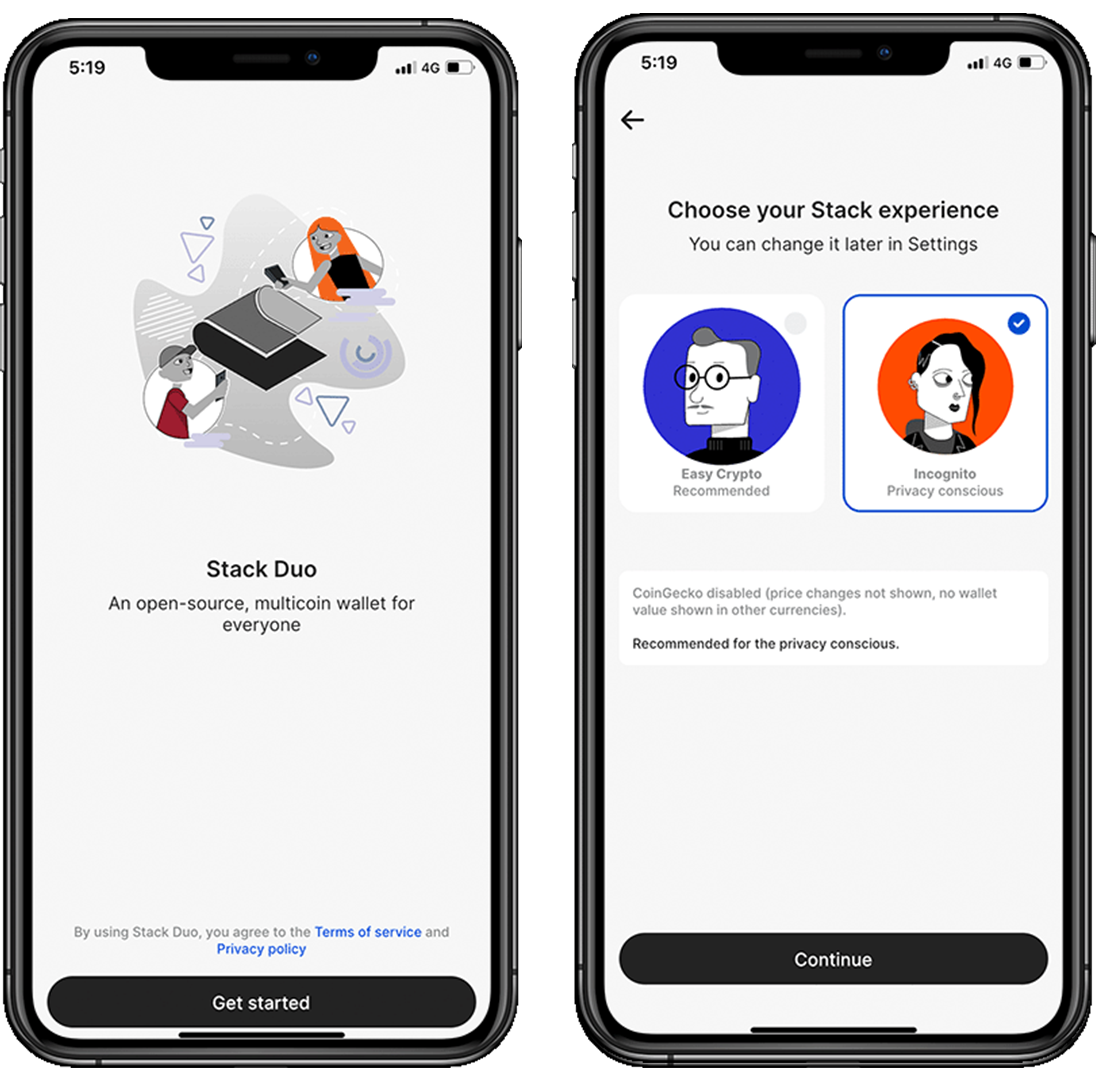
Stack Duo makes it intuitive and easy to get started with non-custodial wallets. After opening the app, click on get started.
You will be prompted to select one of two profiles: Easy Crypto or Incognito.
Easy Crypto will enable a third party app called CoinGecko to track prices. On the other hand, Incognito disables this feature, improving the privacy of the user.
CoinGecko is a popular cryptocurrency market data platform that provides information on thousands of digital assets. While the platform itself is not inherently malicious, having it run in the background could potentially expose users to privacy risks depending on the app's implementation and data management practices.
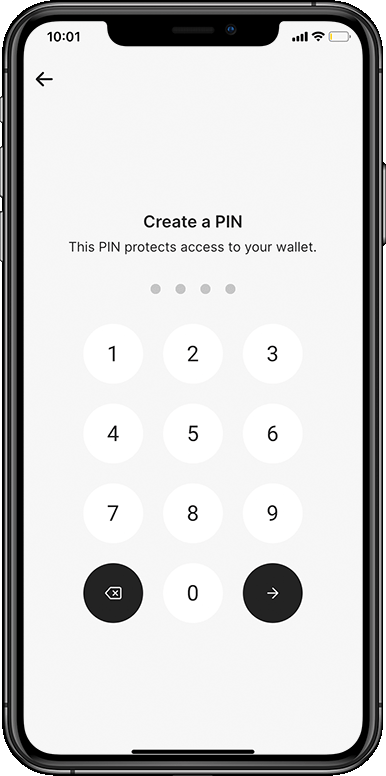
You will now create a pin code to access your Stack Duo. This password is specific to Stack Duo and has nothing to do with the underlying wallet seeds.
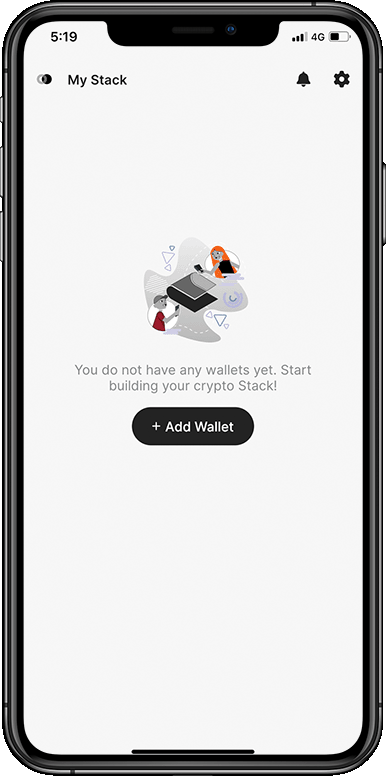
Welcome to Stack Duo!
Connect to your Node – Optional Step#
Stack Duo allows local connections to Electrum servers, if possible it is highly recommended to do so. If you don't have a node, then skip this step.
- In the top-right corner press
Settings>Manage Nodes>Bitcoin Nodes>+.
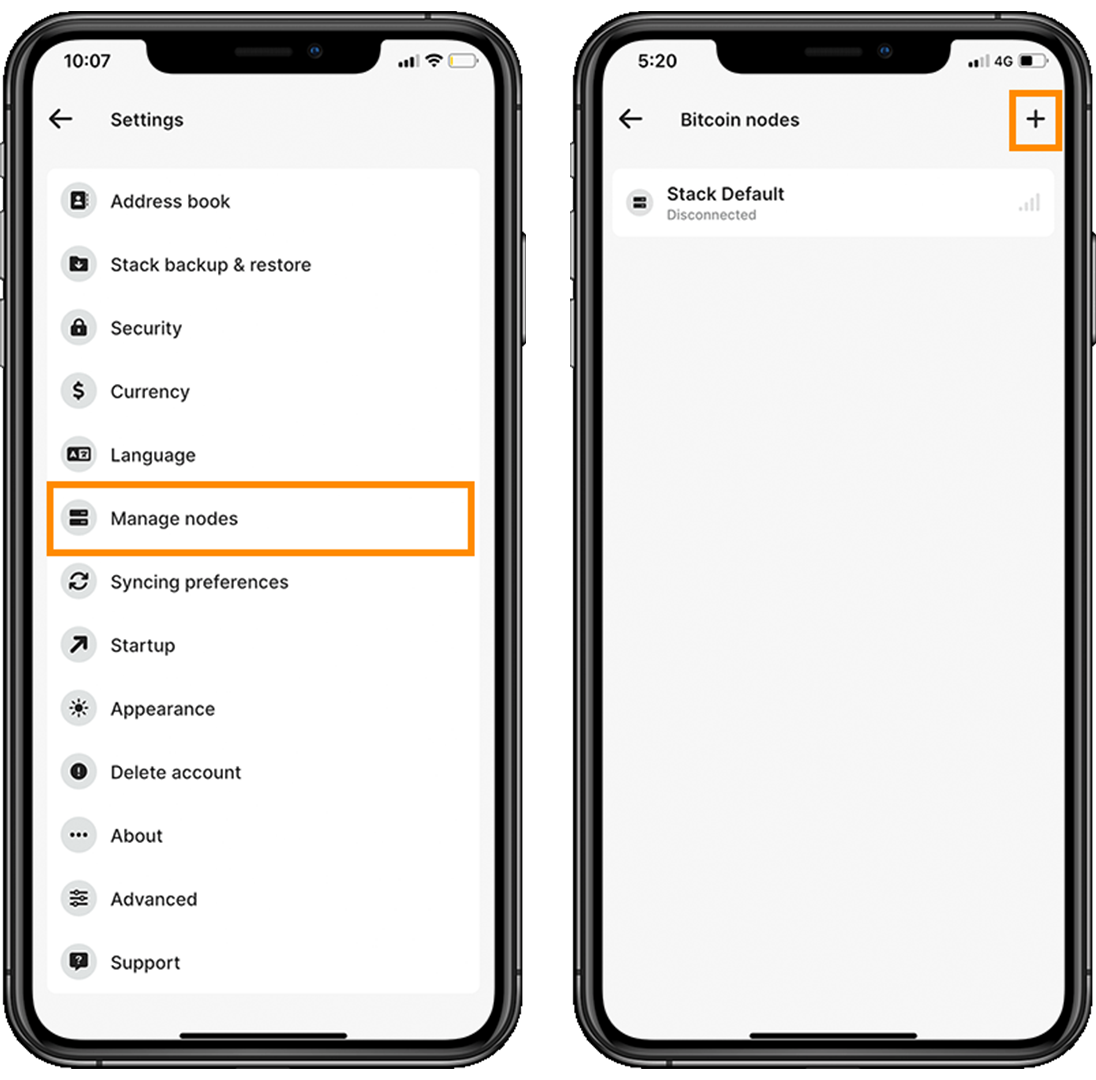
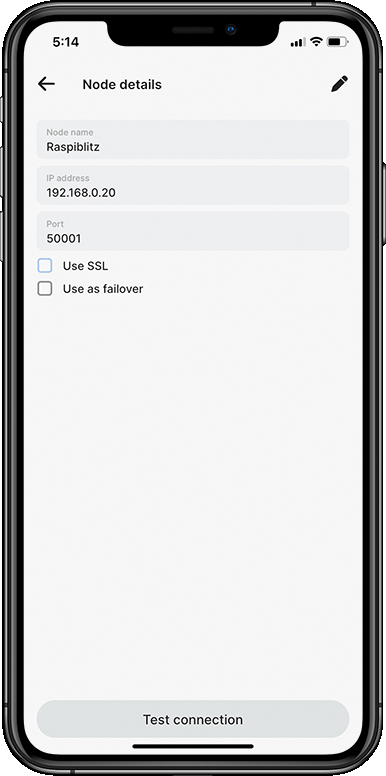
- Insert the local IP of your node. Note that if you have a RoninDojo, you cannot connect locally as such and will have to connect over Tor. However, Tor is not yet available natively on Stack Duo.
Wallet creation#
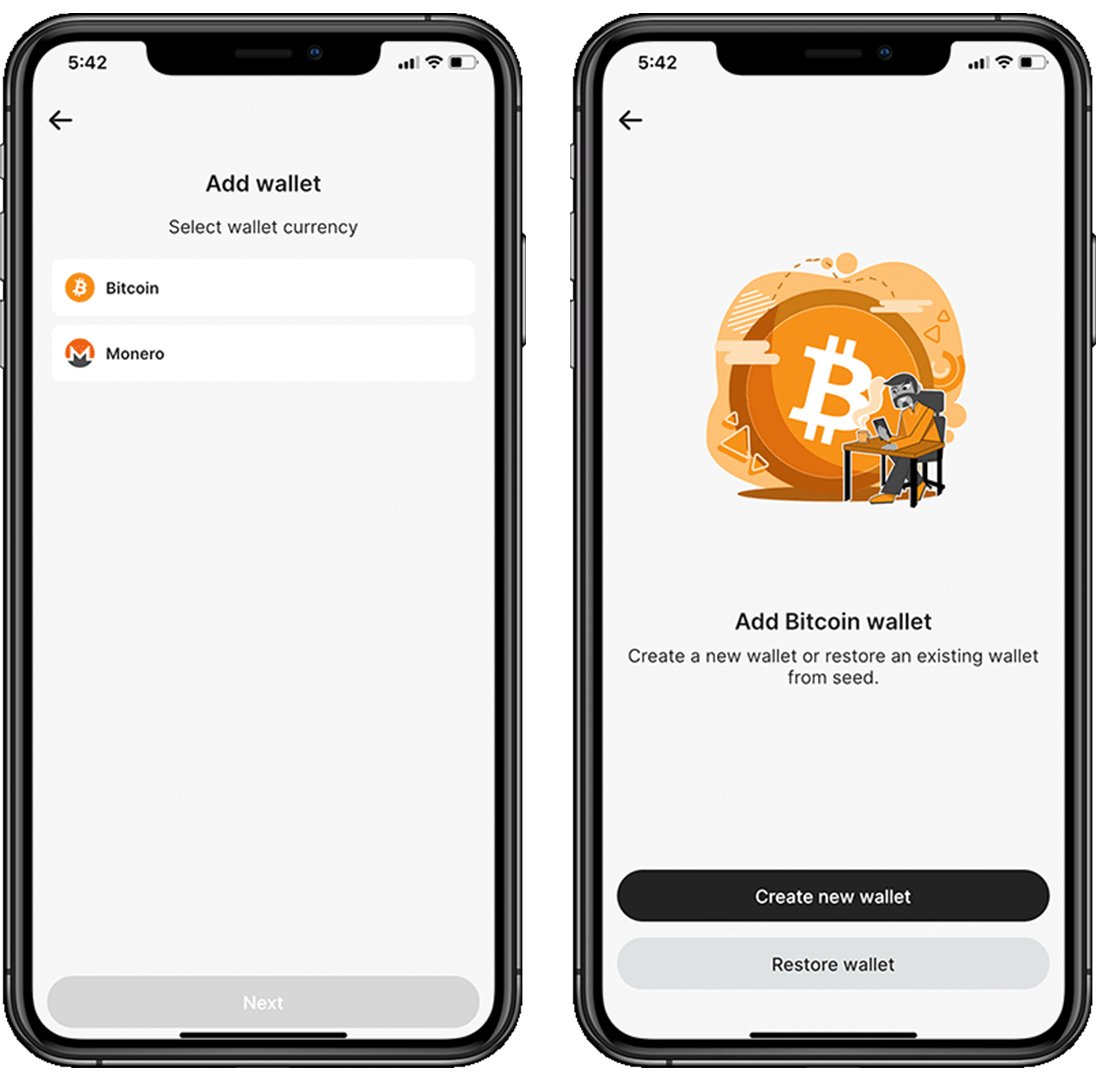
Once Stack Duo is connected to your node, go back to the home page and add your first wallet. Select Add Wallet and add a Bitcoin Wallet. We will create a new wallet, but you also have the possibility to restore a wallet with a seed phrase if necessary.
Home > Add Wallet > Bitcoin > Create new Wallet.
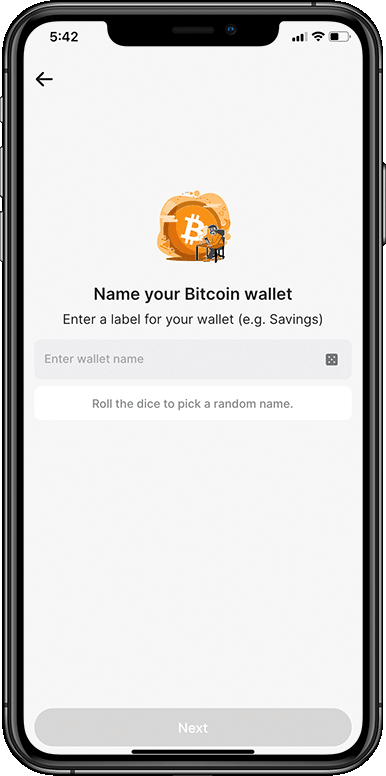
You are asked to name your wallet because Stack Duo allows more than one wallet per cryptocurrency. For instance, you could have different wallets such as non-KYC, daily spending and Hodl. You can also roll the dice for a random name.
You will be shown a warning page before Stack Duo reveals your 24 recovery words. Tick the white box on the bottom left of your screen after reading the instructions.
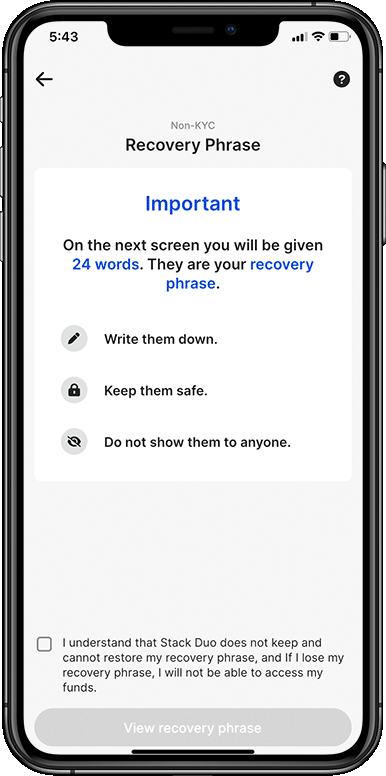
Take note of your recovery/seed phrase in the correct order. This is the key to your funds, do not show it to anyone else and keep it safe.
In the next page, you will be asked to select one random word from the list. Select the correct word associated with the number on your screen.
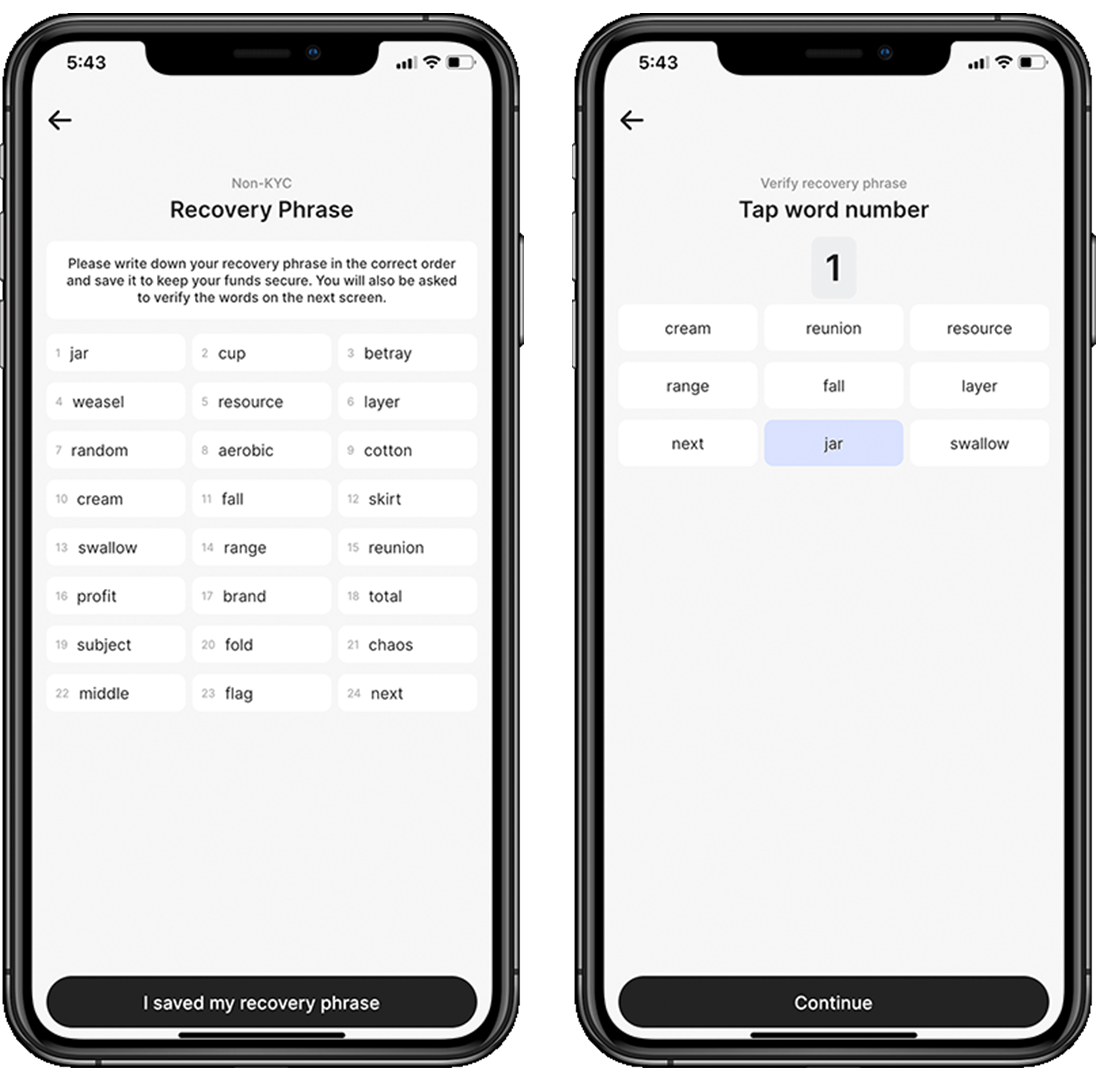
That's it! You have created a brand new Bitcoin wallet in Stack duo! You will notice that your home page is now different and displays your favourite and active wallets.
Receive a transaction#
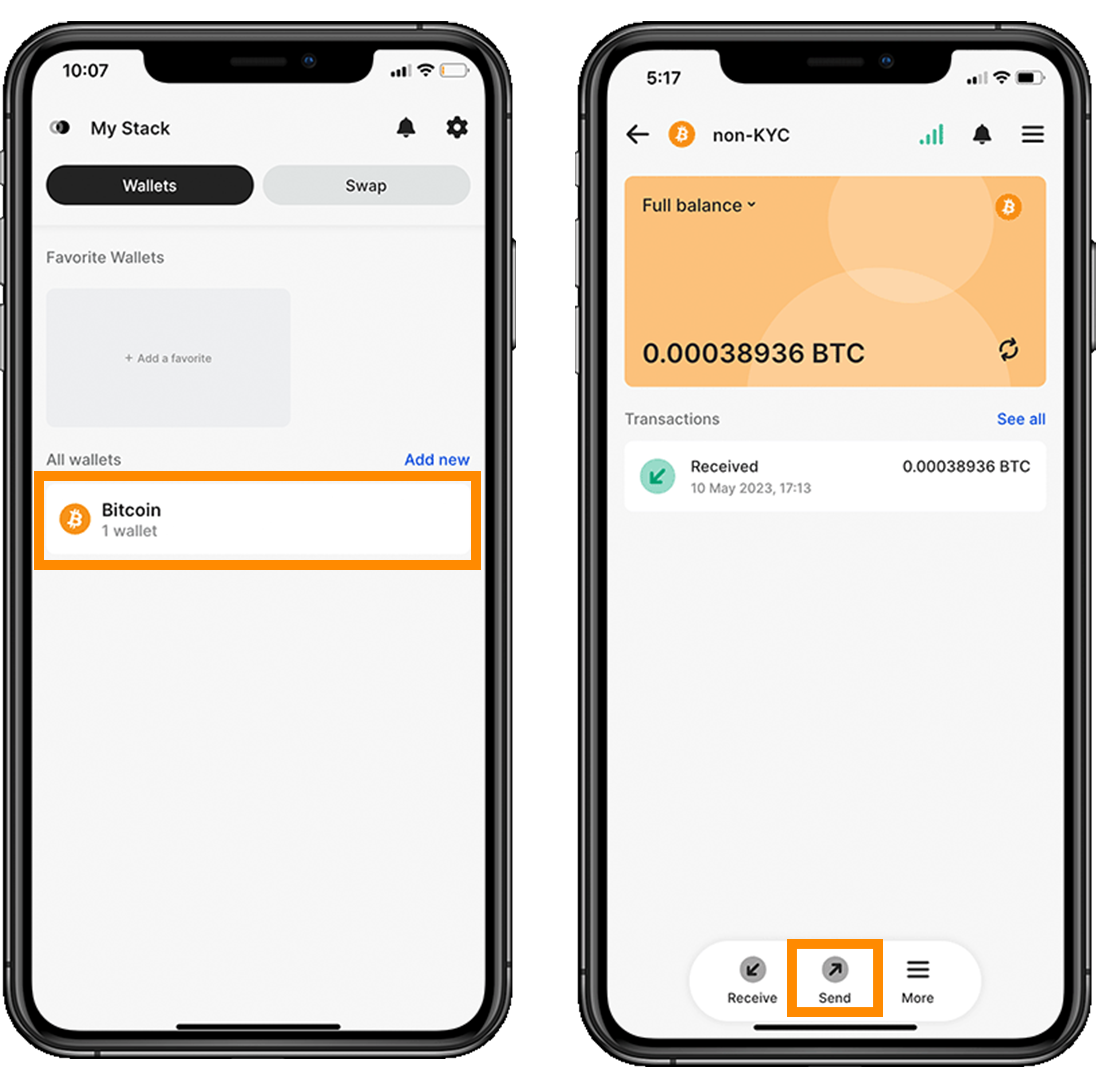
- Back to your new home page, select the wallet you wish to receive sats to.
- Click
receiveon the bottom left corner.
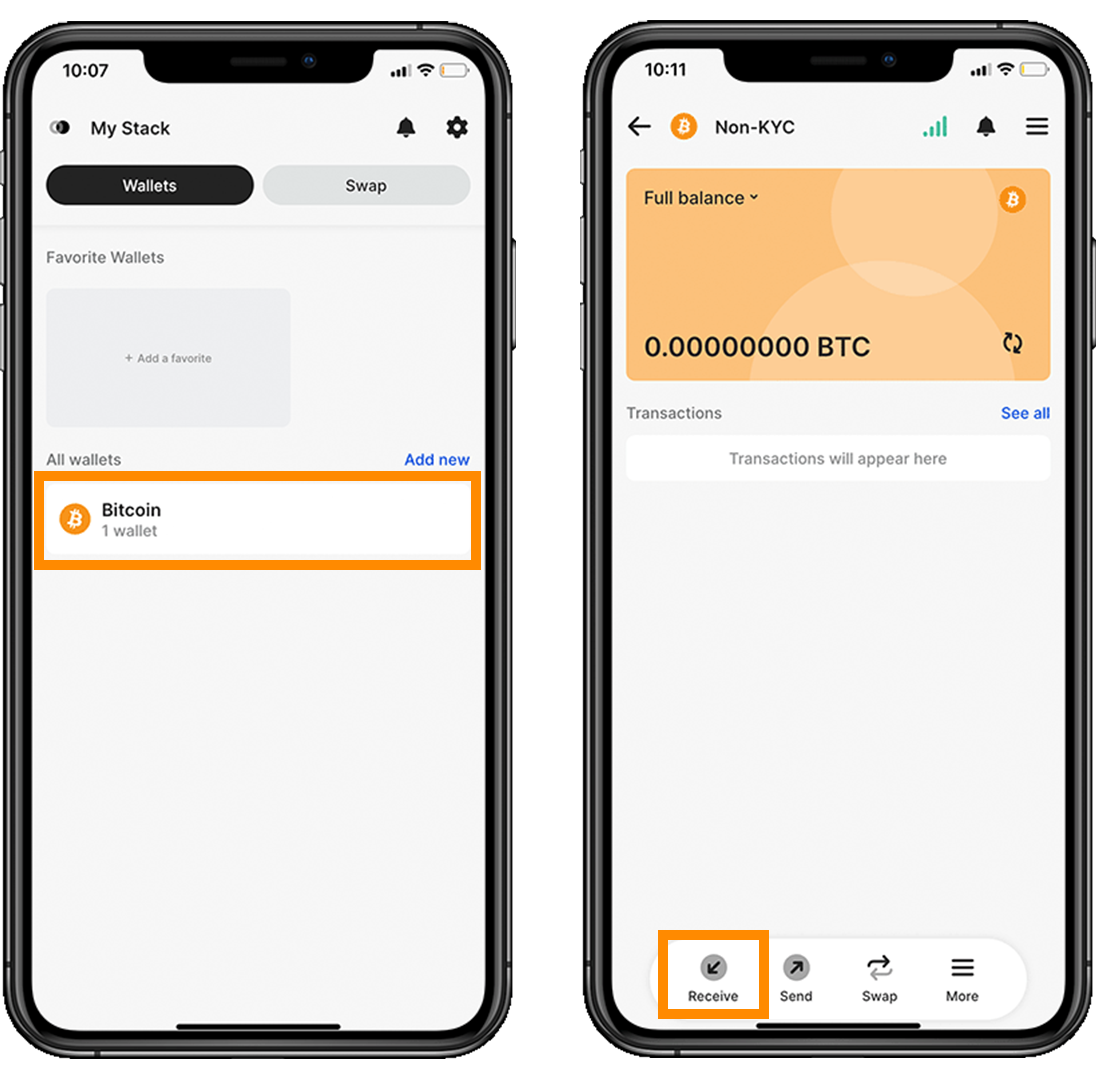
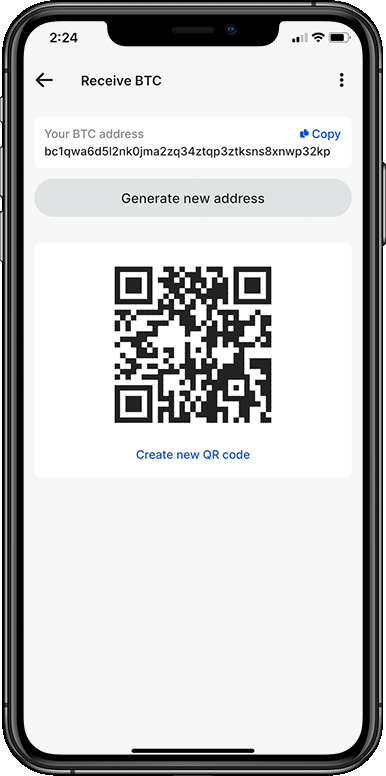
- Like any great wallets, you can generate a new address each time you receive a transaction. You can share the address or QR code with whoever is sending you bitcoin.
Send a transaction#
Using these steps the wallet will choose which UTXO’s it spends for you.
- Back to your home page, select the wallet you wish to send sats from.
- On the bottom of the screen, click
Send.
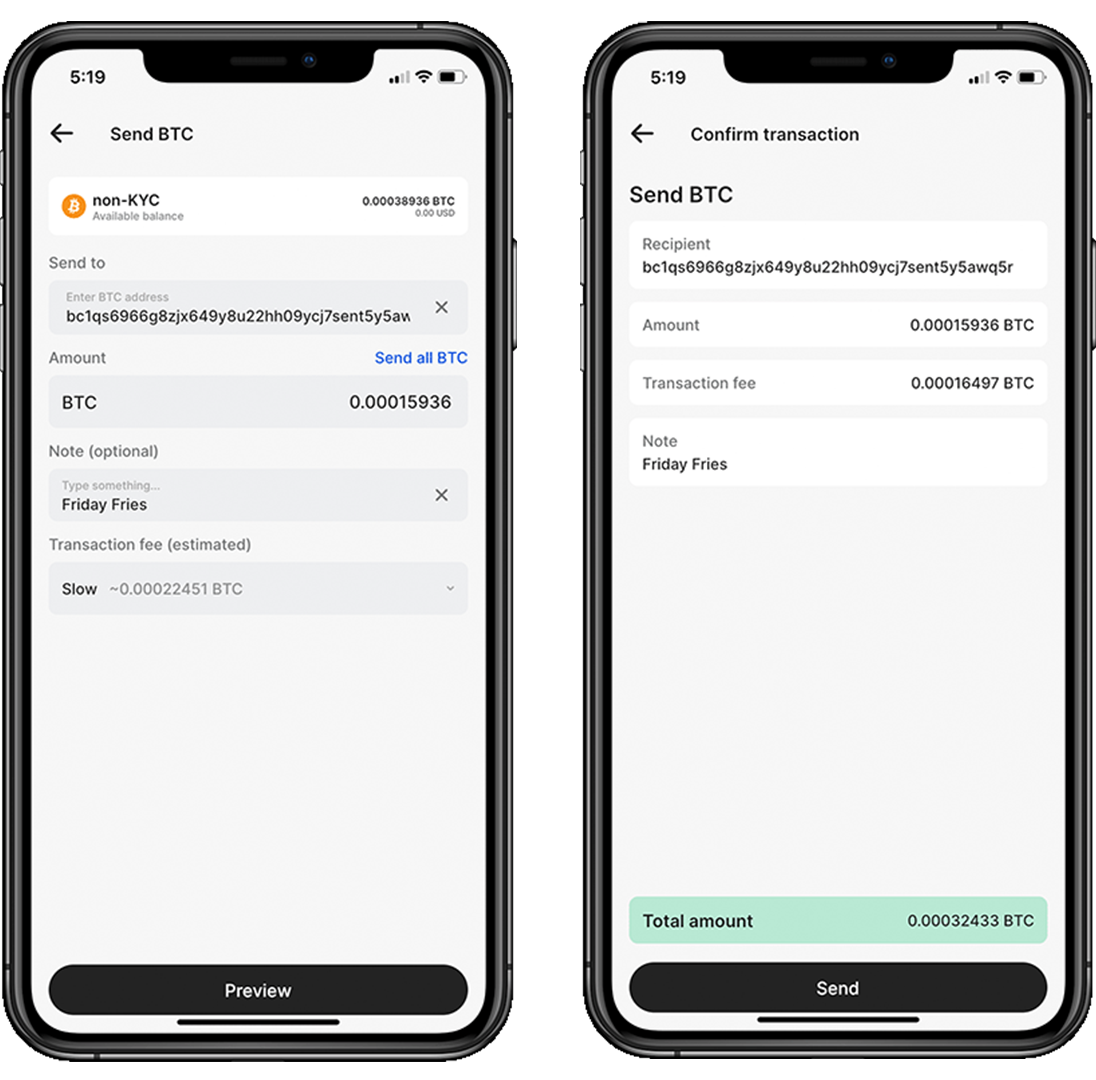
- You can paste the address, scan a QR code or select an address in your address book (more on that later).
- Insert the amount of sats you wish to send.
- Give the transaction a note.
- Select the transaction fee.
- Preview and confirm your transaction.
Backup your wallets#
Stack Duo Backup is a convenience feature that makes it simple and easy to restore all of your wallets at once. You can decide to either back up automatically your wallets locally into an encrypted file or manually back your wallets up.
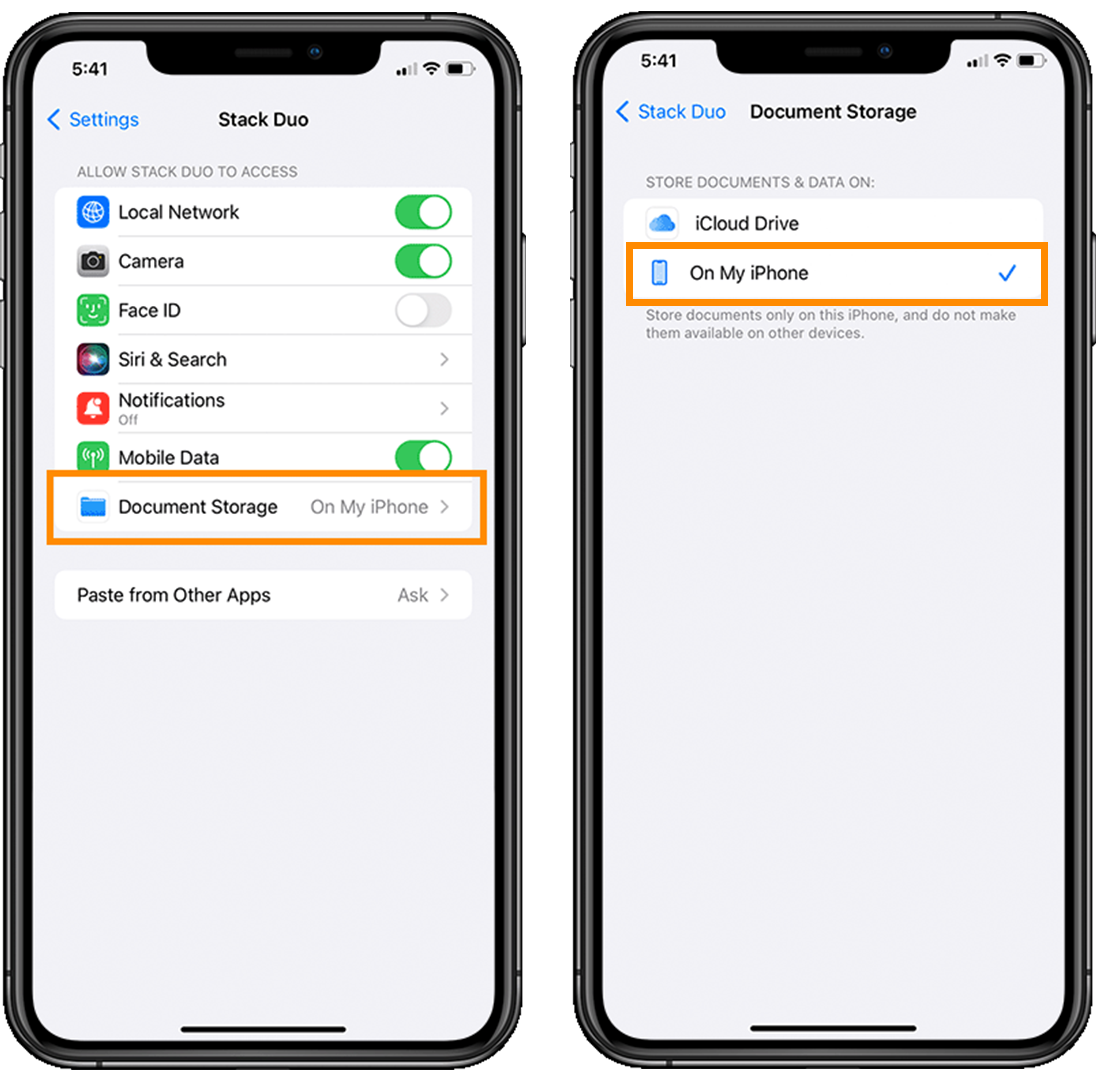
If you are on iOS, it is necessary to store this file locally and not on iCloud!
- Go out of Stack duo and navigate to
Settings, scroll down until you find Stack Duo in the list of apps on your iPhone. - Click on
Document Storage - Select
On my iPhone
- Back to Stack Duo, navigate to your
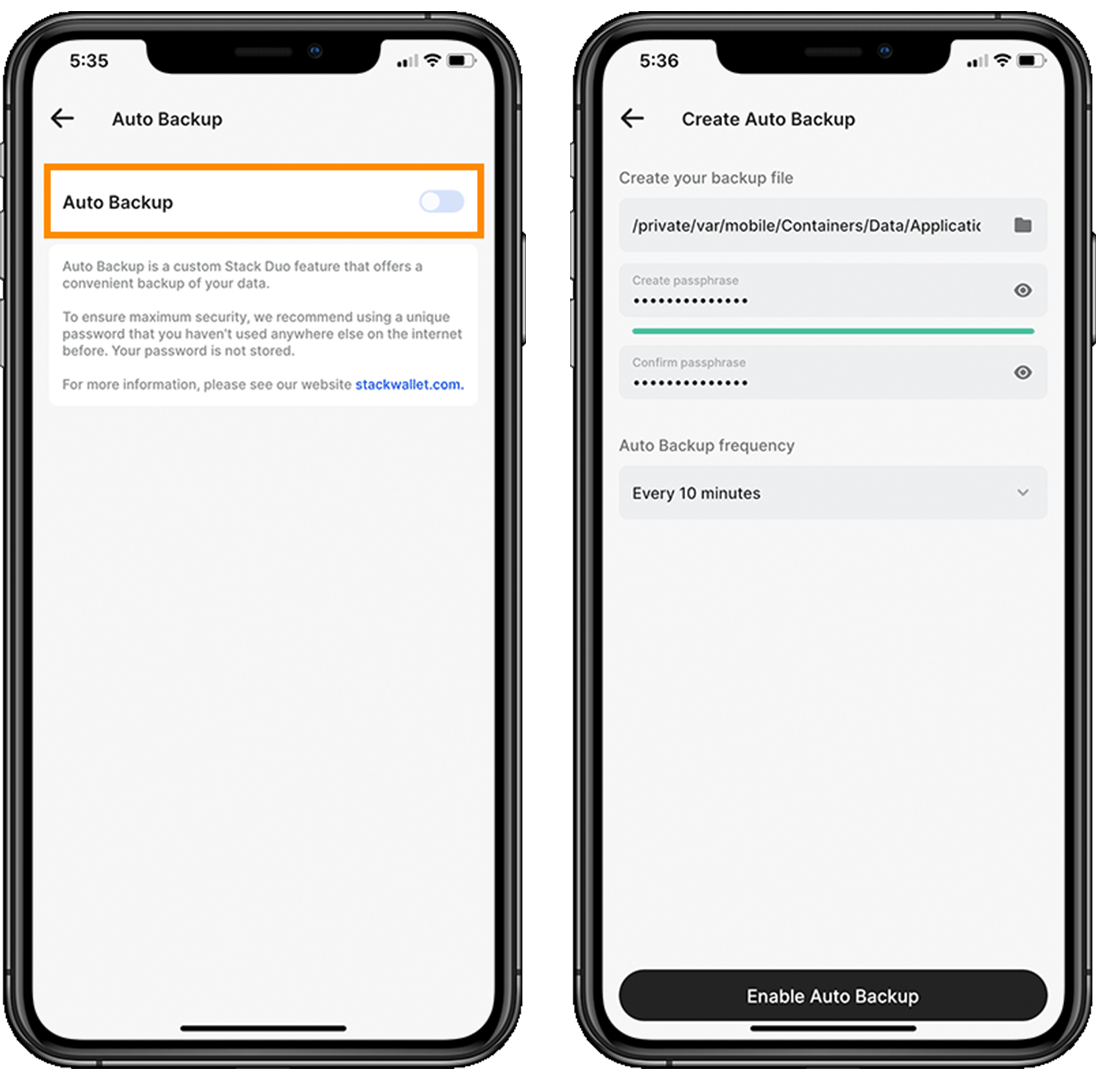
Settings>Stack backup & restore>Enter your pin>Auto backup.
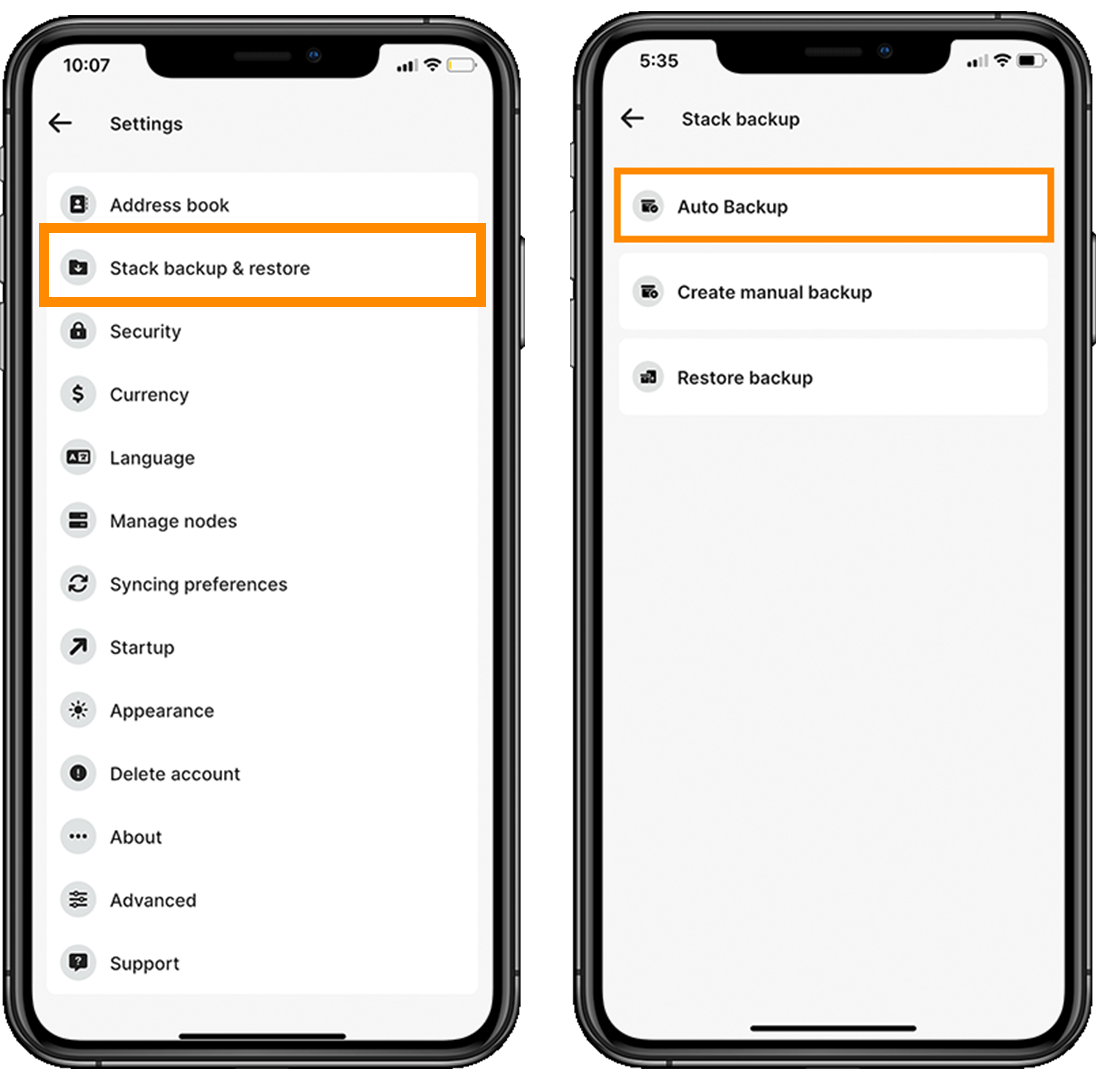
- Toggle on Auto Backup.
- Click on the folder icon and select the place where you would like to store the encrypted files.
- Enter a secure passphrase – THIS MUST BE INSERTED WHEN YOU RESTORE YOUR WALLET, KEEP IT SAFE.
- Select the frequency of the auto back up: every 10 minutes, every app start or after closing a wallet.
Restore your wallets#
If you followed the previous step, you will now have the possibility to restore all your wallets (if you backed them up) in one convenient process. Note that this backup only works in Stack Duo/Wallet!
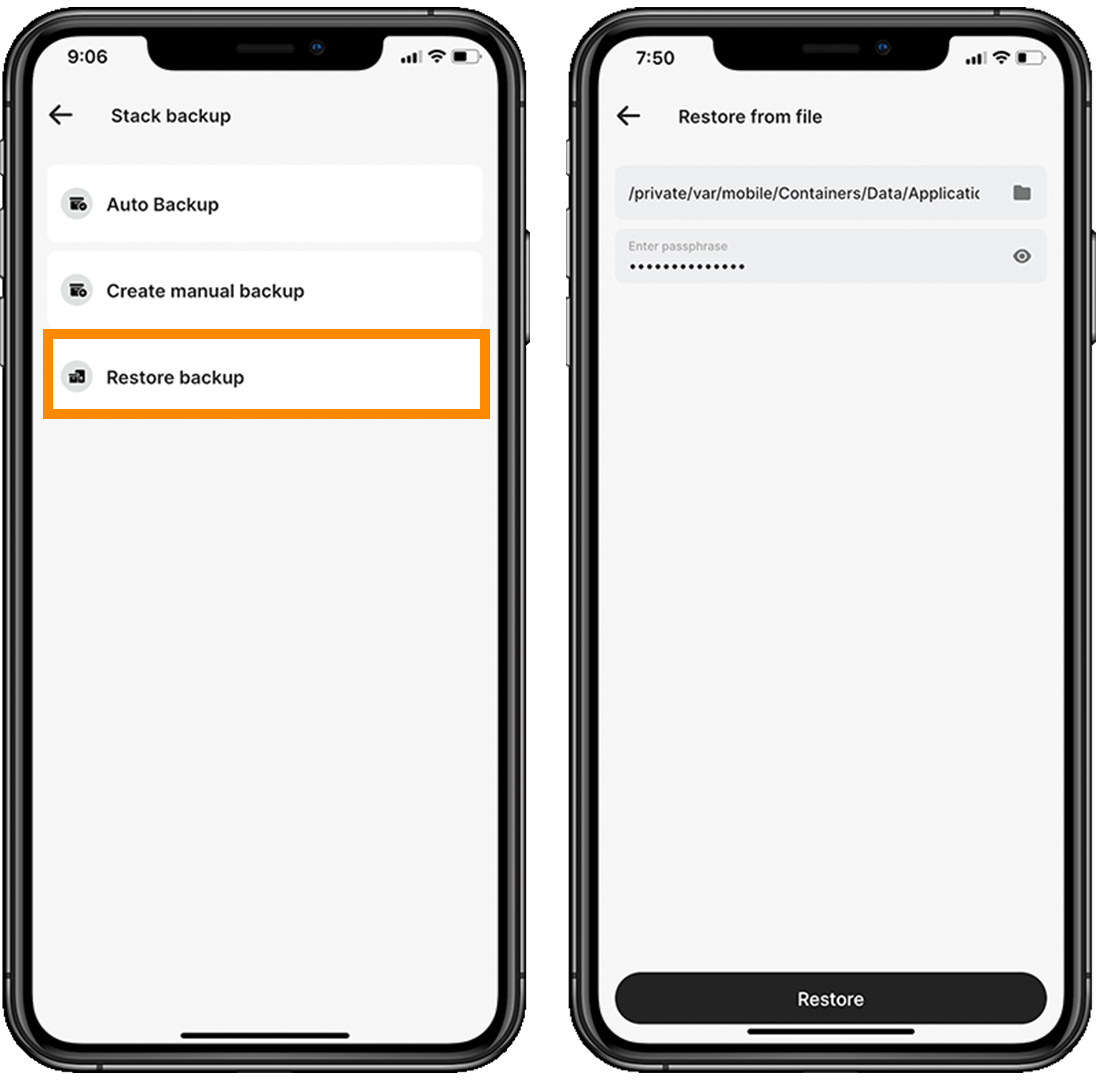
- Go to your
Settings Stack backup & restoreRestore backup- Select the latest auto backup file or latest manual backup file. The file should be named:
stackautobackup.swborstackbackup.swb. - Enter the same passphrase you had entered when setting up the backup file.
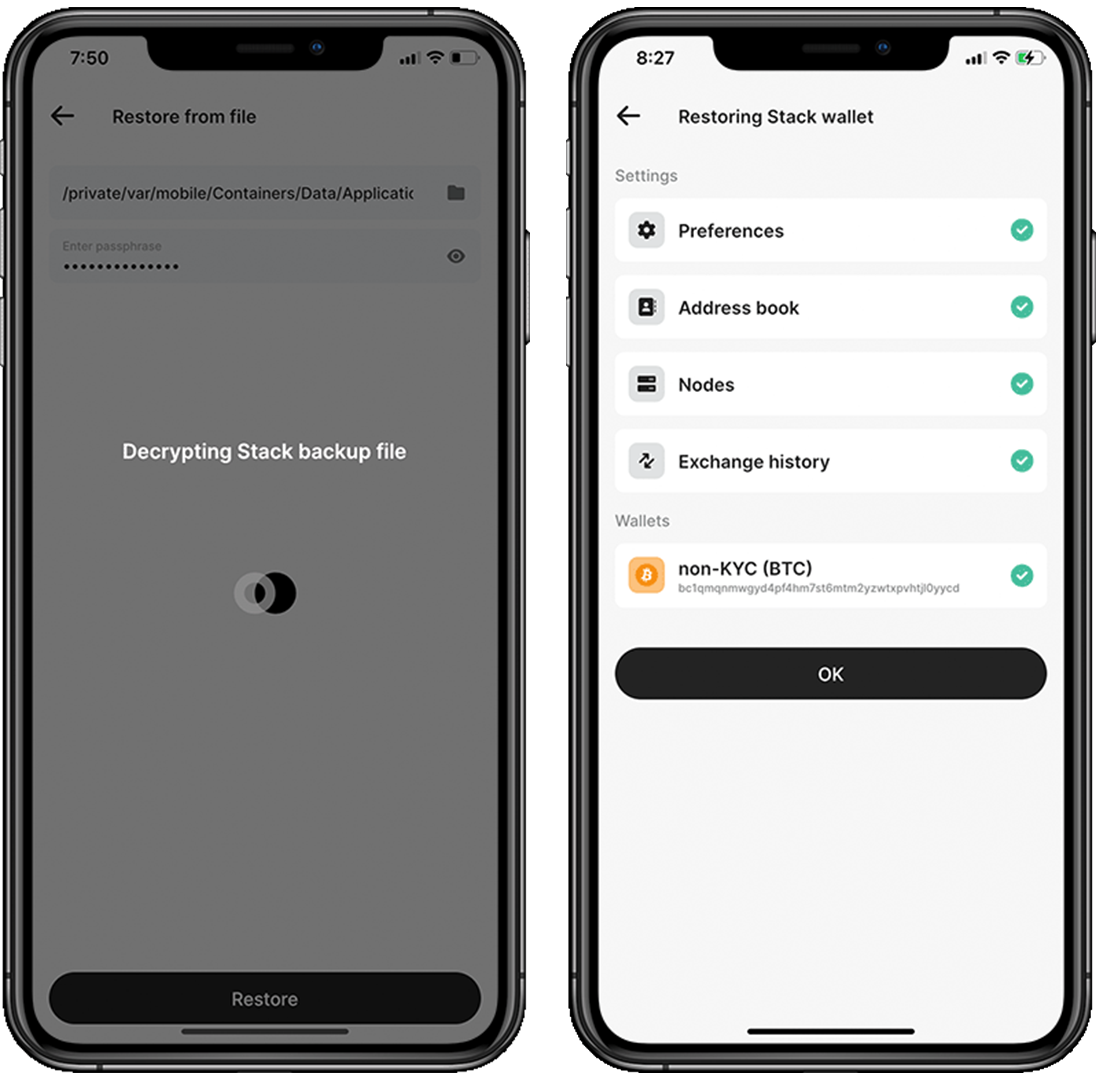
- Let Stack Duo decrypt the file.
- You should see all the wallets that were backed up appearing at the bottom of your screen.
- Click
OK - Go back to the home screen, you might have to refresh or close the app to see your wallets re-appear.
UTXO Management#
Coin control, or UTXO (Unspent Transaction Output) management, is a feature that offers users increased control over their transactions. It enables them to handpick the UTXOs they wish to use as inputs while sending bitcoins.
Within the Bitcoin network, transactions are comprised of inputs and outputs. Inputs signify the origin of the bitcoins being spent, while outputs represent the destinations to which the bitcoins are directed. UTXOs are the outputs from previous transactions that have not been spent, and they represent the balance of bitcoins in a user's wallet.
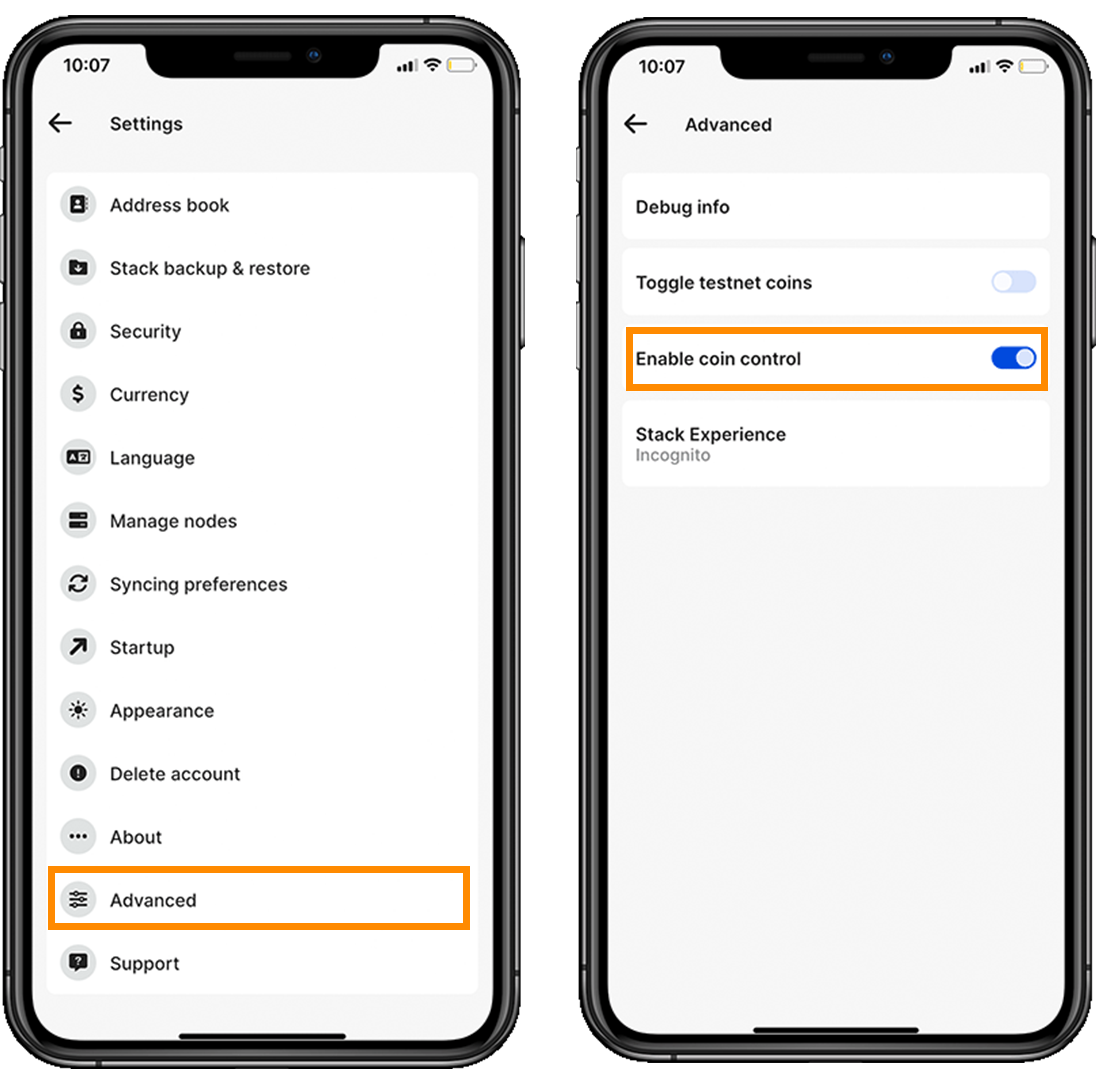
Go to the Settings > Advanced and toggle on Coin control.
Furthermore, Stack Duo allows you to freeze certain UTXOs that might compromise your privacy. By freezing certain UTXOs, users can better control which addresses are linked to their transactions, making it more difficult for third parties to trace their transaction history or associate addresses with a single user.
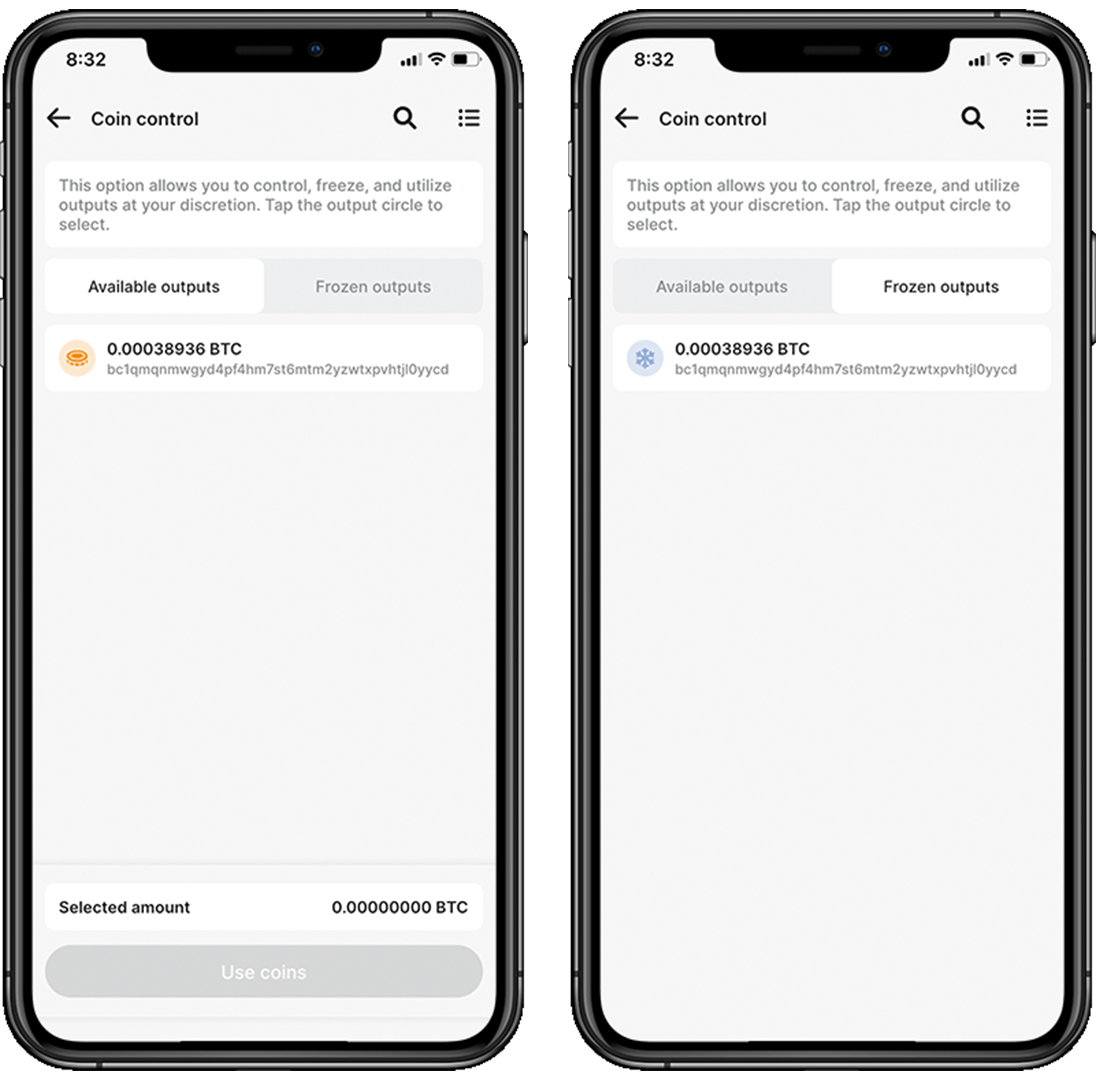
Stack Duo wrote an extensive guide on Coin Control, learn more here.
PayNym#
A PayNym, sometimes referred to as a payment code, serves as a method to enhance privacy in Bitcoin transactions. By enabling users to generate a distinct payment address for each transaction, PayNyms eliminate the need to share one's actual Bitcoin address. Consequently, this increases privacy and makes it harder to trace transactions to their origin.
As a result, even if someone is closely observing the blockchain, associating transactions with a particular user becomes significantly more challenging due to each transaction possessing a unique address.
- Select your wallet.
- On the bottom right, click on
More>PayNym. - This will ask you to generate a new PayNym.
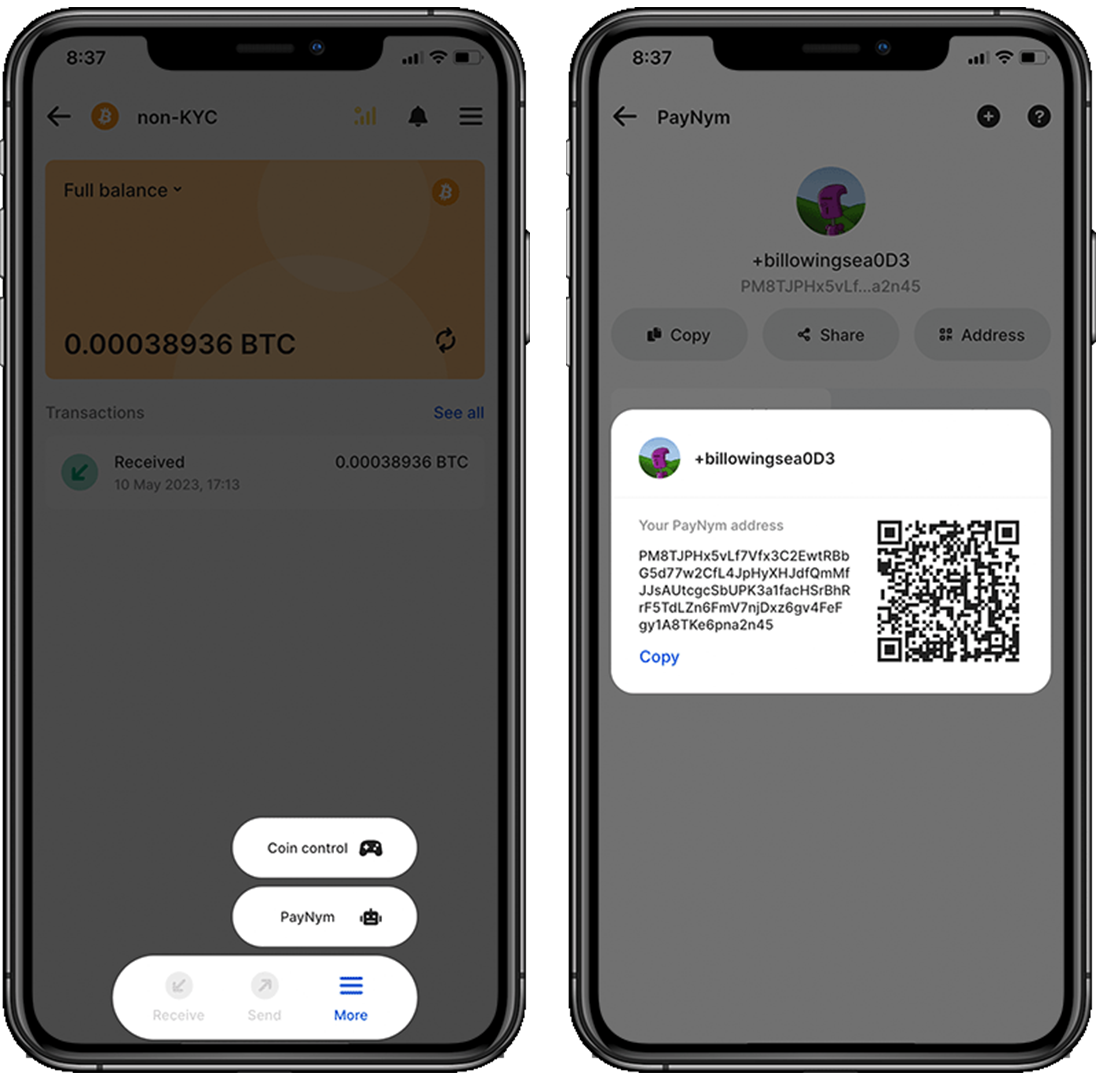
You can now share this PayNym, QR code or address to other people and not have to manual generate new addresses. This is a big step forward for your privacy!
What's more, you can follow other PayNyms in Stack Duo to simplify transactions to friends, family or here’s mine, feel free to connect…

If you're interested in learning about the benefits and technical aspects of PayNym, I've created a comprehensive guide available for you to read here.
Address Book#
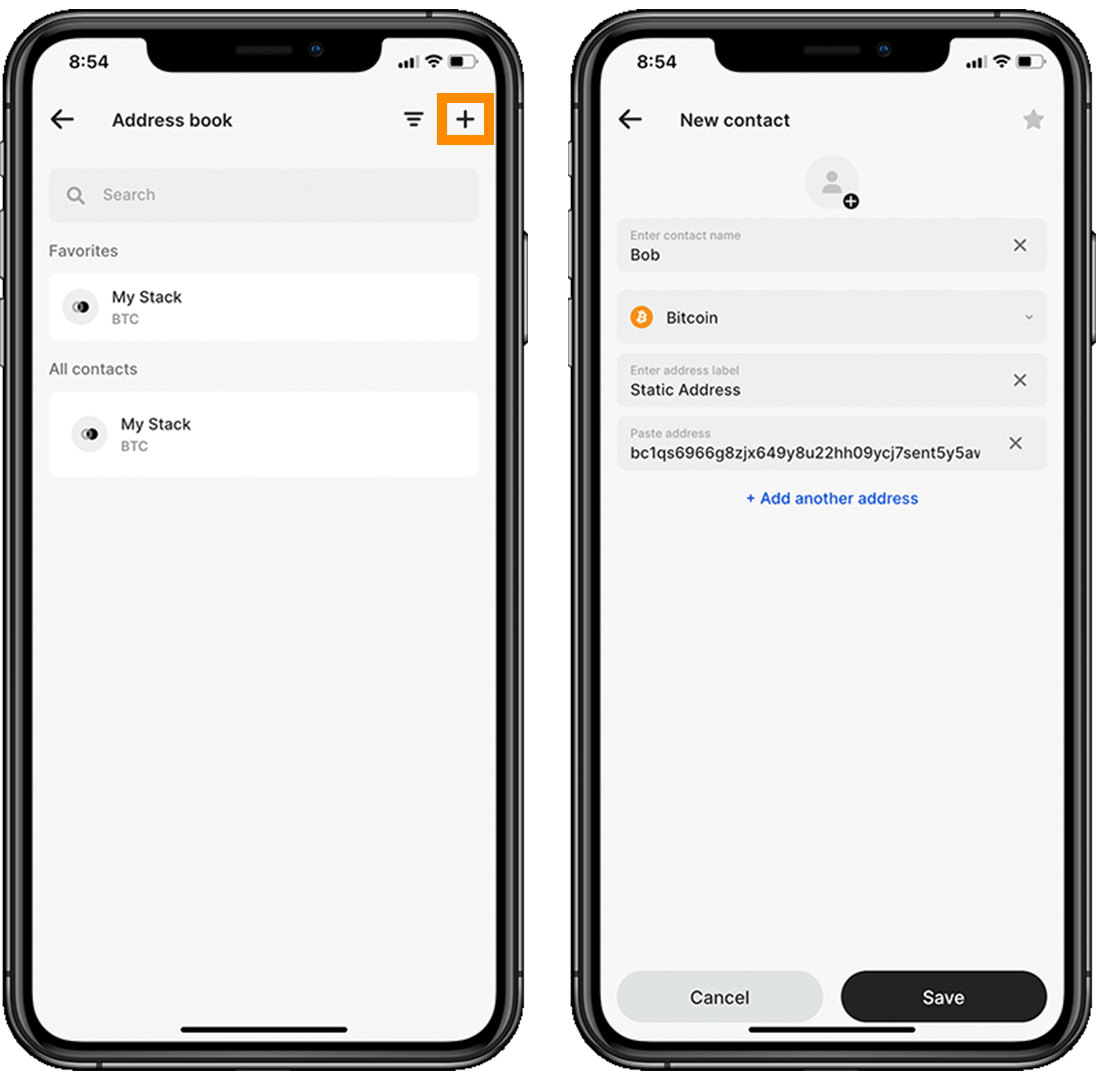
An address book is a feature that allows users to store and organize Bitcoin addresses, usually by associating them with names or labels. This makes it easier for users to manage their transactions and identify recipients without having to memorize or manually track the long alphanumeric Bitcoin addresses.
However, address books encourage users to reuse the same Bitcoin addresses for multiple transactions, which can compromise privacy. It is highly recommended to use a new address for each transaction to make it harder for third parties to link transactions to a specific user.
It will soon be possible to add PayNym addresses to the address book, which is a big leap in convenience and privacy. Stay tuned!
Multi Wallet Support#
With Stack Duo, users can generate both Bitcoin and Monero seeds in one convenient location. There's no need to stick to just one wallet per cryptocurrency - Stack Duo allows for multiple wallets for each type. Just make sure to back up each recovery key individually for added security.
On the home page, click on Add New and either add a Bitcoin or Monero wallet.

Built-in exchange#
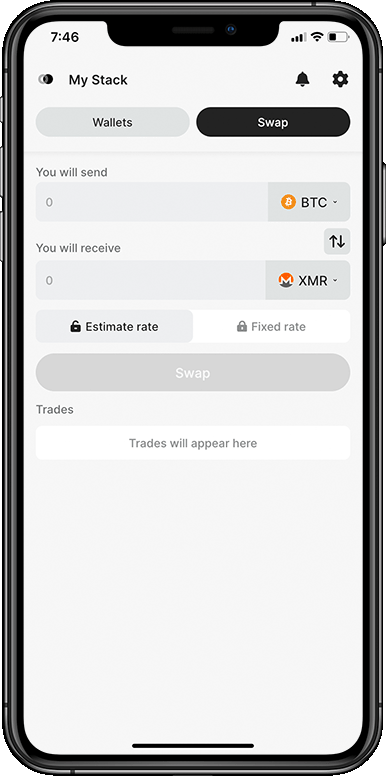
Stack Duo collaborates with third-party exchange providers, such as Majestic bank or Change Now, to facilitate exchanges. Stack Duo does not conduct exchanges on their own. The app integrates these third-party services to provide a smooth experience. Your funds will be transferred to the third-party exchange, which will then send the exchanged coin back to you.
According to kycnot.me, both exchanges are non-KYC. Although, it seems like Change Now normally does not require KYC but it could be that one of your transactions is marked as suspicious and then they will require you a KYC procedure. Read more here.
Stack Duo charges a small fee along with their third-party exchange providers for using the integrated exchange service. However, for regular Bitcoin and Monero transactions, all fees are paid to the blockchain miners.
Learn more about Stack Duo#
The Team
The team behind Stack Wallet/Duo are UI/UX designers who believe that access to efficient tools should be intuitive for people to adopt them. Scrappy user-interfaces are an obstacle to Bitcoin onboarding and adoption for the vast majority of people.
"What people don't realize about design is when we make bad design that forces people to struggle with how to use things ... we are stealing human life." – Diego from Stack Duo
Podcast Appearance
Ungovernable Misfits had the chance to discuss with Diego from Stack Wallet. In this conversation, Diego talks about the possibility of Stack Wallet Duo enabling Whirlpool usage for users in the near future. He also shares the difficulties faced in integrating privacy features such as Tor on Apple devices. Find the episode here.
Relevant Links
Stack Duo is open-source. Not partially open. Not mostly open. Completely open. You can find the code source here.
Download Stack Duo today for iOS, Android, Linux and M1 Mac:
If you have any questions feel free to join the welcoming community on the various options:
Don't forget to follow them on Twitter for regular updates!
About the writer
Hi, I'm Bitlevi! I crystallise what I learn on my journey to sovereignty by writing about Bitcoin and FOSS tools. Feel free to message me on Twitter or visit my website. If you enjoyed this guide and would like to donate, here is my PayNym!
Disclaimer — All views expressed in this article are my own and not those of the Stack Wallet/Duo developer team.
Comments
No comments yet. Start the conversation.