
Last week was brutal for online security. In a few days, PHP, Node.js and Go all shipped security fixes, a certificate authority's keys turned out to be broken, home media servers got hijacked, and a popular AI software package shipped with a password stealer built in. On October 21, TechCrunch ran the headline "The internet is having a very bad cybersecurity day." Two days later the EFF wrote that "three percent of all software vulnerabilities ever found in history were found just in the month of October."
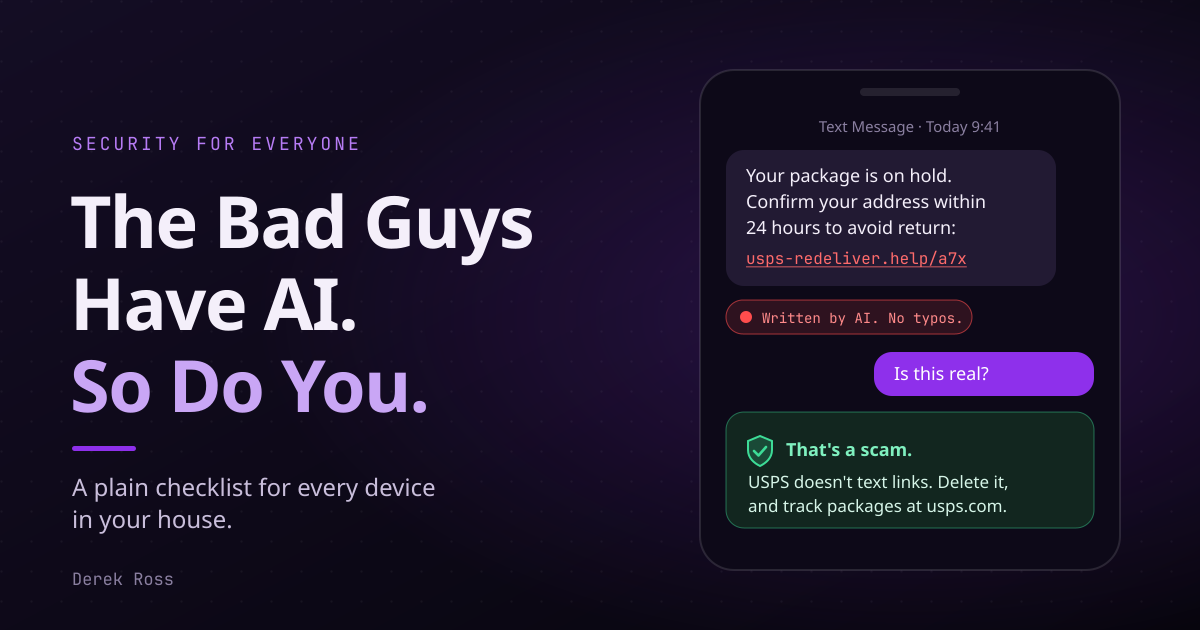
At the same time, the people attacking you have AI. The scam emails don't have typos anymore. The fake login pages look real. The voice on the phone can sound like your kid.
This post is the bare minimum for you and your family. Send it to the people you already do tech support for.
What broke#
You don't need to run a server for this to matter. The websites and apps you use every day run on this stuff, and so does some of the gear in your house.
- PHP2Shell. PHP runs a huge share of the web, including WordPress and Drupal sites. Two flaws let anyone take over a PHP web server without logging in. The details leaked a day before the fix was ready, and a security firm accidentally published a video of its working attack. Exploits were circulating the night before the patch shipped on October 21. (Bitsight, Simon Willison)
- Node.js and Go. Node fixed 10 vulnerabilities on October 21, four of them high severity, including ways to fool an app about who it's talking to. Older versions of Node get no fix at all. Go shipped security releases on October 8 and 19. (Node.js, Go)
- A broken padlock. The padlock in your browser depends on companies called certificate authorities. On October 17, eight certificates from one of them, eMudhra, were found to have weak keys. Firefox, Chrome and Apple all rushed to block them. (BleepingComputer)
- Plex2Shell. Plex is the media server a lot of people run at home for movies and TV. A chain of four bugs let attackers take over Plex servers without a password. The attack went public on October 16, and by October 17 attackers were using hijacked servers to mine crypto. If you run Plex, update to 1.43.3 or later now. (BleepingComputer)
- A poisoned AI package. LiteLLM, a popular tool developers use to connect apps to AI models, was hijacked on October 21. For about two hours, the official download included a program that stole passwords and keys. (Datadog Security Labs)
- Your phone and computer. Apple patched an iPhone and Mac bug on September 28 that was already being used in attacks. Microsoft's October update fixed a record of about 1,400 flaws, including one attackers were using to make downloaded files skip the usual warning. (CISA, BleepingComputer)
- Breaches. In one week: Capcom (11.7 million accounts), Burger King Japan (11.18 million records), ETS (5.7 million students) and Nikkei. (Privacy Guides)
Old bugs still get used too. On October 8, the US government's list of actively exploited vulnerabilities added five that are between three and eleven years old. Gear that never gets updated stays vulnerable forever.
I've been giving this talk for 20 years#
About 20 years ago I ran a computer consulting and repair business for homes and small and medium businesses. A lot of the job was cleaning up computers, and a lot of it was teaching people how not to need me again.
Back then the enemy was adware, spyware and malware. People brought in computers buried under browser toolbars, pop-ups and fake antivirus programs that demanded money to remove the viruses they had installed themselves. My advice fit on an index card: don't download random things, and don't click on things.
A lot has gotten easier since then:
- Phones and computers update themselves, usually overnight.
- Windows comes with antivirus built in, and phones only install apps from stores that check them first.
- Almost every website is encrypted now, which is what the padlock means.
- Passkeys and password managers are free and built into your phone.
A lot has also gotten harder. Back then you had one computer, and the worst case was usually losing what was on it. Now your bank, your email, your photos, your doctor, your doorbell, your thermostat and your kids' school all live online, and most of it is tied to the phone in your pocket. Attackers stopped going after the computer and started going after you: your accounts, your phone number, your trust. Instead of a virus that slows down your PC, it's a perfect fake text from your bank, or a call that sounds like your daughter.
The index card still holds. Don't download random things, and don't click on things. It just isn't the whole card anymore.
The bad guys have AI#
The old advice was to look for bad spelling and weird grammar. That's done.
- The FBI warns that criminals use AI to write believable messages with no typos, build fake websites with chatbots on them, clone voices for "family emergency" calls, and fake people on live video calls.
- In a Harvard study, fully AI-written phishing emails got a 54% click rate, the same as emails written by human experts and more than four times the 12% for generic phishing. (The Register)
- Proofpoint found tens of thousands of phishing websites a month built with an AI website builder, faking Microsoft, UPS and others. (Proofpoint)
- An employee at the engineering firm Arup sent $25.6 million to criminals after a video call where the "CFO" and several coworkers were all deepfakes. (CNN via ABC17)
- Google found malware in the wild that asks an AI model to rewrite its own code so antivirus can't recognize it. (BleepingComputer)
One thing to do today: pick a family safe word. If someone calls sounding like your mom or your son and asks for money, ask for the word.
The checklist#
1. Update every device#
Phones, tablets, laptops, desktops. All of them, including the old iPad in the drawer that the kids still use.
- iPhone or iPad: Settings > General > Software Update. Then turn on Automatic Updates.
- Android: Settings > System > Software updates. Also check Google Play system updates, which are separate (on a Pixel, Settings > Security & privacy > Updates). Menu names vary by phone maker.
- Windows: Settings > Windows Update > Check for updates, then restart.
- Mac: System Settings > General > Software Update. Click the (i) next to Automatic Updates and turn everything on, including Security Responses.
Turn on automatic updates everywhere so you don't have to remember.
2. Updating the OS isn't enough. Update your apps.#
Your phone can be fully patched and still run a two-year-old app with a known hole in it. Do this on every device:
- iPhone: open the App Store, tap your profile picture, and tap Update All.
- Android: open Google Play, tap your profile icon, then Manage apps & device > Update all. Turn on auto-update in Play's settings.
- Windows: open the Microsoft Store and go to Downloads to check for updates. If you're comfortable with a terminal,
winget upgrade --allupdates most other apps. - Mac: App Store > Updates.
- Your browser: Chrome downloads updates on its own but doesn't install them until you restart it. Go to Help > About Google Chrome and click Relaunch. Firefox works the same way. Safari updates with your Mac or iPhone.
Apps like Zoom, Slack and Discord update themselves, but only when you restart them. Quit them once in a while.
3. Update the house#
Your router, modem, mesh Wi-Fi, printer, smart TV, cameras and smart plugs are all computers, and they all need updates.
- Routers and mesh Wi-Fi: open the router's app (TP-Link Deco or Tether, eero, Google Home, Netgear Orbi, ASUS Router) or its admin page (usually 192.168.0.1 or 192.168.1.1). Look for Firmware or Software Update. Turn on automatic updates if it has the option, and turn off remote management.
- Modems from your internet provider usually update automatically. If yours is ancient, ask them to swap it.
- Printers: HP printers update through the HP Smart app. Epson has the Epson Software Updater. Brother has a firmware tool on its support site for your model.
- Everything else: check the device's app for an update option. If you can't find one, search the model number plus "firmware update."
Replace anything that no longer gets updates. In May 2025 the FBI warned that criminals take over old, unsupported routers and rent them out to other criminals as proxies. The malware they use "does not require a password." The FBI also said routers from 2010 or earlier likely no longer receive updates. If your router is that old, a new one is cheaper than the problem.
4. Put your gadgets in jail, and give guests their own Wi-Fi#
You're only as secure as the weakest device on your network. That might be a $10 smart plug that will never see another update, or a friend's phone that hasn't been updated in a year, or the sketchy site your nephew visits while he's on your Wi-Fi.
Most modern routers let you split your network so those devices can't reach your laptop or your files:
- IoT network: put smart plugs, cameras, TVs, speakers and printers on their own network. On TP-Link Deco it's More > IoT Network. On ASUS it's Guest Network Pro > IoT Network, and turn off "Use same subnet as main network."
- Guest network: create one and give that password to visitors, not your main one. On eero it's Settings > Guest wifi network. On Deco it's More > Guest Network. On Orbi, make sure guests can't see each other or your local network.
Most smart home gear only works on 2.4 GHz, so set the IoT network to that if your router asks.
5. Use a VPN#
A VPN encrypts your traffic between your device and the VPN provider. It protects you on coffee shop and airport Wi-Fi, and it keeps your internet provider from seeing every site you visit. Use one, even a free one:
- Proton VPN Free: no ads, no data cap, a no-logs policy that has been independently audited, and open-source apps. It's limited to one device and picks the server for you. (Proton)
- VPN by Google: built into Pixel 7 and newer phones (Settings > Network & internet > VPN > VPN by Google), and included with Google Fi. The old Google One VPN was shut down in 2024. (Google)
- Cloudflare 1.1.1.1 with WARP: free, and encrypts your traffic on public Wi-Fi.
- iCloud Private Relay: included with paid iCloud+, and covers Safari.
Be clear about what a VPN does. It does not stop phishing, malware or a stolen password. You still need everything else on this list.
6. Never click a link someone sent you#
Never click or open a link that was emailed, texted or DMed to you. Assume every one is phishing, even when it looks like it came from your bank, your boss, the post office or your best friend. Their account could be hacked, and AI makes fakes look perfect.
What to do instead:
- Go to the website yourself. Type the address or use the company's app.
- If it's about money, call the number on the back of your card or on your statement, never a number in the message.
- Never share a login code with anyone. Your bank will never call you and ask for one.
- Never install software because someone called, emailed or messaged you out of nowhere.
Report what you get. Forward phishing emails to reportphishing@apwg.org, forward scam texts to 7726 (SPAM), and report fraud at ReportFraud.ftc.gov. (FTC)
7. Use a password manager#
Every account gets its own long, random password, and you only remember one. When a site you use gets breached (and some will), the attackers get a password that works nowhere else.
- Bitwarden: free, open source, works on every device. (Bitwarden)
- Proton Pass: free tier with unlimited devices.
- 1Password: paid, very polished.
- Already built in: Apple's Passwords app on iPhone and Mac, and Google Password Manager in Chrome and Android.
Any of these is much better than reusing the same password everywhere.
8. Turn on two-factor authentication, and passkeys where you can#
Two-factor authentication means a stolen password isn't enough to get in. Not all of it is equally strong:
- Best: passkeys or a security key. A passkey replaces your password with your face, fingerprint or PIN, and it can't be phished. Turn them on for your email, Apple, Google and Microsoft accounts, your bank, and your password manager first. For Google, go to g.co/passkeys. A hardware key like a YubiKey is the strongest option. Buy two and keep one as a backup.
- Good: an authenticator app. 2FAS, Ente Auth, Proton Authenticator, Aegis (Android) or Google Authenticator.
- Weakest: text message codes. Criminals can steal your phone number with a SIM swap. If SMS is your only option, use it, and ask your carrier for a PIN and a port-out lock on your account.
Before you remove SMS from an account, save the recovery codes. Print them or keep them in your password manager.
9. Back up what matters, encrypted#
If ransomware hits, or a phone gets lost, a backup is the difference between an annoying afternoon and losing your photos forever.
- Keep three copies of anything important, on two kinds of storage, with one somewhere other than your house.
- iPhone: turn on iCloud Advanced Data Protection (Settings > your name > iCloud) so your backups are end-to-end encrypted.
- Mac: use Time Machine with "Encrypt Backup" checked.
- Android: Settings > Google > Backup.
- Test it. Restore one file once in a while to make sure the backup actually works.
10. If you might be a target, turn on Lockdown Mode#
Apple's Lockdown Mode shuts off the features attackers most often use to break into iPhones and Macs. It blocks most message attachments and link previews, some web features, and FaceTime calls from people you haven't contacted. Apple built it for people who might be personally targeted: journalists, activists, people in the public eye, or anyone holding a lot of money in crypto. It will break some things, but if any of that sounds like you, turn it on in Settings > Privacy & Security > Lockdown Mode on every Apple device you own. You have to turn it on separately on each one. (Apple)
You have AI too#
AI cuts both ways. OpenAI says people use ChatGPT to spot scams up to three times more often than scammers use it to run them. Here's how to put a chatbot to work.
What to ask#
- "Is this a scam?" Paste in the text of a suspicious email or message (take out your name, account numbers and anything personal) and ask what the red flags are.
- "Where does this link really go?" Paste the link as text, without clicking it, and ask the AI to point out the real domain and any lookalike tricks.
- "Walk me through it." Ask for step-by-step help: updating your exact router model, turning on passkeys for your Google account, setting up a guest network, or reviewing the privacy settings on your phone or Facebook.
- "Does this affect me?" When you see a scary security headline, paste it in and ask what it means for you and what you should update.
- "Check my plan." Describe the devices in your house in general terms and ask what you're missing from this checklist.
Which AI to use#
- Claude, ChatGPT and Meta AI (in WhatsApp, Instagram and Messenger) are all good for a second opinion on a suspicious message or for walking you through settings. Check the privacy settings in each one, since some use your chats for training unless you opt out.
- Grok: fine for a quick question in the Grok app, but don't ask @grok about a suspicious message in public replies on X, because everyone can see what you post. Studies have also found it unreliable at fact-checking (DFRLab via Al-Monitor), so double-check what it tells you.
- OpenClaw and Hermes are AI agents you run yourself, and they can do far more, like reading your email or running tasks on your computer. They're powerful, but they're for people who are comfortable setting up their own software. They also carry more risk. OpenClaw's add-on marketplace was found hosting 341 malicious add-ons, many of them password stealers, and a bug let a single malicious link take over the agent. (The Hacker News) If you use one, keep it updated, only install add-ons you trust, and don't expose it to the internet.
Turn on the AI protection you already have#
- Android: turn on Scam Detection in the Phone app's settings. It warns you during a call if it sounds like a scam, and the audio never leaves your phone. It's off by default.
- Google Messages flags scam texts and suspicious links.
- Chrome: Settings > Privacy and security > Security > Enhanced protection. It uses on-device AI to catch scam pages.
- iPhone: iOS 26 can screen calls from unknown numbers and filter texts from unknown senders into a separate list.
- Bitdefender Scamio is a free chatbot that checks texts, links and QR codes.
The rules for using AI safely#
- Never paste passwords, recovery codes, login codes, card numbers or crypto seed phrases into any AI.
- AI can be wrong. Treat it as a second opinion. If it says a message from your bank looks real, still call the number on your card.
- Be careful letting AI read your email or browse for you. Hidden text in an email or web page can give an AI agent instructions you never see. OpenAI has said this problem "may never be fully solved." (CyberScoop)
For the IT person in your life#
If you're the one who manages a business network, or just the family server, in case you missed it:
- Patch every operating system, browser, VPN, firewall, router, NAS and internet-facing service. Start with anything on the CISA Known Exploited Vulnerabilities catalog. That includes Plex, and the PHP version under every WordPress site you host.
- Take admin panels off the internet. Put management access behind a VPN, WireGuard, or Tailscale with Tailnet Lock turned on.
- Require phishing-resistant MFA or passkeys. CISA calls FIDO/WebAuthn the only widely available phishing-resistant MFA. (CISA)
- Isolate cameras, printers and other IoT devices from trusted networks.
- Keep offline or immutable backups, and test restoring them.
Start today#
None of this is hard, and none of it requires being a tech person. If the whole list is too much, do one item a day this week. Start with updates and a family safe word.
Then send this to your parents, your kids, and the friend who still uses the same password for everything. Attackers only need one way in, and too often it's someone you love clicking a link that looked real.
When in doubt, ask AI for help.
Comments0
No comments yet. Start the conversation.